The “No-Language” Hack: Using Your Phone Camera to Read Menus.
How your phone camera translates the world around you — from medicine labels to bus timetables to the jar that might be honey or might be something with teeth
It is 11pm. You are in a convenience store in Thailand, Vietnam, Japan — pick your adventure — and you feel rough. Not terrible, just that familiar travel-weary, slightly-off feeling that could be dehydration, could be the heat, could be something you ate at lunch that has been conducting a quiet experiment in your digestive system ever since. You need something from the pharmacy shelf. There are twelve options in front of you. The packaging is colourful and entirely in a language you cannot read. One of them is probably perfect. One of them is definitely for something else entirely. You have absolutely no idea which is which.
Or perhaps you are standing at a bus stop, squinting at a timetable board, trying to work out if the bus that just left was yours or whether there is another one coming, and in which direction, and whether that destination name on the front means what you think it means or whether you are about to take a very scenic and very unplanned detour.
Or you are in the convenience store again — because honestly, the 7-Eleven is one of the great institutions of Southeast Asian travel — holding a jar that could be honey, could be fish paste, could be a condiment beloved by millions or an acquired taste that takes decades to acquire. The label is beautiful. The contents are a mystery.
These are the moments that carry more anxiety than they should, and they add up across a trip in a way that quietly drains you. Not dramatic disasters — just a persistent low-level uncertainty about the world immediately around you. The good news is that the solution has been sitting in your pocket the whole time.
The Tool That Changes Everything
 Your phone camera, pointed at any text in any language, can translate what it sees in real time. Not perfectly. Not poetically. But well enough to tell the difference between a pain reliever and an antihistamine, between the bus to the city centre and the bus to the coast, between a jar of palm sugar and a jar of fermented shrimp paste. That distinction — ‘well enough’ — is the one that matters.
The main tools worth knowing are Google Translate’s camera function, Google Lens, and Apple Translate. All three work on the same principle: point, hold steady, read. Google Translate has been doing this longest and works across the widest range of languages. Google Lens is built into most Android cameras and many search functions and can translate text in photos as well as live. Apple Translate has a clean camera mode that works beautifully for iOS users. Any of them will serve you well. The best one is whichever is already on your phone and ready to use before you need it urgently. (See the video below which explains it so much better than I ever could)
A few years ago this felt like science fiction. Now it is just Tuesday. And yet a remarkable number of travellers either do not know it exists, have not tested it before a trip, or forget about it entirely in the moment of need and stand there squinting at a label like they are trying to decode ancient runes through sheer determination.
Medicine Labels: The Most Important Use of All
Let’s start with the one that matters most, because this is not just about convenience — it is about safety. Medicine labels in foreign languages are genuinely important to read correctly. Active ingredients, dosage instructions, warnings, contraindications — these things matter whether you are buying paracetamol in a Thai pharmacy or picking up something for an upset stomach in a Vietnamese convenience store.
Camera translation will not give you a perfect pharmaceutical breakdown, but it will tell you the key words: the active ingredient, the dosage, whether it says “adults only,” whether there is a warning about drowsiness, whether it contains something you know you react badly to. For travellers with allergies, existing conditions, or regular medications that could interact with something new, this is not optional knowledge. It is the minimum due diligence.
Practical tip: if you are buying medication in a country where you do not speak the language, photograph the label before you buy, translate it, check the active ingredients, and then decide. If you are uncertain, ask the pharmacist using your translation app to type or speak the question. Most pharmacists in tourist-frequented areas have some English, but a translated typed question removes the ambiguity on both sides.
And this is precisely the moment when your Carricard earns its place in your wallet. Your allergy information, your regular medications, your medical history — all of it accessible via a QR code that any pharmacist or doctor can scan. Camera translation reads the label. Your Carricard tells them about you. Together, those two tools make a foreign pharmacy visit considerably less stressful.
Convenience Store Labels: The Honey-or-Fish-Paste Problem
The 7-Eleven, FamilyMart, and their regional equivalents are one of the great pleasures of travelling in Southeast Asia and East Asia. They are open at all hours, they are air-conditioned, and they contain an extraordinary range of things you recognise, things you almost recognise, and things that look like they require a prior relationship with the culture to understand.
The unlabelled or foreign-labelled mystery item is a genuine travel experience. You want to try things. You also want to know, at a basic level, what you are putting in your mouth. Is this sweet or savoury? Does it contain dairy? Is that ‘spicy’ icon decorative or a warning? Is the powder you are about to mix with water a vitamin supplement or a protein shake or something you should only take if you weigh considerably more than you do?
Camera translation handles this beautifully. Scan the ingredient list. Look for the key words relevant to you: peanut, shellfish, dairy, gluten, pork, MSG if you are sensitive to it, sugar content if you are watching it. You will not get a perfect nutritional analysis — the translation is functional rather than forensic — but you will get enough to make an informed decision. Which is all you actually need.
The jar that turned out to be fermented shrimp paste when I was hoping for something spreadable and mild is a memory I carry with considerable affection. Mostly because I checked first.
Bus Timetables, Street Signs, and Is This the Way to Amarillo
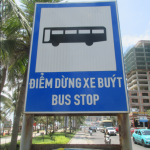 Navigation without a common language is one of the genuine challenges of independent travel, and it does not only happen in the obvious moments. Yes, Google Maps helps enormously — and if you haven’t already read the guide on using it offline, that is your next stop — but Maps does not always capture what is written on the bus destination board, the platform sign, the handwritten notice on the taxi window, or the small printed card taped to the ticket machine explaining that this particular service does not run on Thursdays or public holidays, a fact you are discovering at 8:47am on a Thursday.
Camera translation fills those gaps. Point it at the destination board. Point it at the timetable. Point it at the sign above the platform, the notice on the door, the handwritten directions someone gave you that you photographed but could not read. It will not always give you a perfect sentence — timetables in particular can come back as a creative mix of numbers and partially translated words — but it gives you enough to orient yourself. The departure time. The direction. Whether the service is running or suspended. Whether that notice is a warning or just an advertisement for a local business.
Street signs are similarly useful in countries that use a different script entirely — Thai, Vietnamese, Japanese, Korean, Arabic, Greek. When the sign above the road means nothing to your eyes, a quick scan can confirm whether you are walking toward the old town or away from it, whether that neighbourhood name matches what is on your map, whether the arrow pointing left leads to the market or the industrial estate. Small confirmations. Big confidence.
And Yes, Restaurant Menus Too — But With Realistic Expectations
Menus are the most talked-about use of camera translation and they are genuinely useful, with one important caveat: the results are functional, not literary. The translation will give you the key words — chicken, beef, shrimp, pork, rice, noodles, soup, fried, grilled, spicy, peanut, egg — and those key words are often enough to make a sensible choice or at least avoid an accidental disaster.
What it will also occasionally give you is accidental poetry. “Angry beef cloud.” “Grandmother fried morning glory.” “Happy pork with jealous noodles.” These translations are not wrong exactly — they just reflect the gap between the language’s original character and what the algorithm can do with it. Treat them as useful clues with occasional comedy value rather than precise descriptions, and you will be fine. Often better than fine — because the person who orders the “angry beef cloud” out of curiosity frequently has the best meal at the table.
For people with genuine dietary restrictions — allergies, religious requirements, medical needs — the camera translation is a first check, not a final guarantee. Always follow up with the server using either spoken words, a typed translated question, or a saved phrase. Do not rely solely on a camera scan for something that could make you seriously unwell. The tool is a bridge, not a certainty.
How to Set It Up Before You Need It
The worst time to figure out how camera translation works is when you are tired, hungry, slightly unwell, and standing in a pharmacy at 11pm in a country where you do not speak the language. The best time is at home, before you go, with a cup of tea and no pressure.
Download Google Translate if you do not already have it. Open it, tap the camera icon, and test it on anything with text — a food packet, a book spine, a label in a foreign supermarket aisle. Get used to where the button is and how steady you need to hold the phone.
Download your destination language for offline use. In Google Translate: settings, downloaded languages, select and download. This means the camera translation works even without Wi-Fi or mobile data — which is exactly when you tend to need it most.
Save your critical food and health phrases in your notes app and screenshot them. “I am allergic to peanuts.” “I cannot eat shellfish.” “I am diabetic.” “I take blood thinners.” Whatever applies to you. Screenshots survive dead batteries, app crashes, and the particular moment when your phone decides to update something at the worst possible time.
Test Google Lens too — on Android it is often built directly into the camera app. Point, hold, tap. It works slightly differently to Google Translate but is often faster for quick checks.
Keep your phone charged. This is the advice that appears in every practical travel article and is ignored by a significant percentage of travellers right up until the moment it matters. A power bank in your day bag is not optional. It is infrastructure.
The Confidence Shift That Changes the Whole Trip
Here is what actually changes when you know how to use this tool properly. You stop choosing the “safe” option by default. You stop gravitating toward the international chain restaurant because the local place has an unreadable sign. You stop buying the familiar product when the unfamiliar one might be better. You stop standing at the bus stop feeling helpless while locals move around you with purpose.
Instead, you step into the smaller places. The ones with plastic stools and handwritten boards and soup pots that look like they have been simmering since before the tourist industry existed. You pick up the jar with the interesting label and actually find out what is in it. You read the notice on the door before assuming the place is closed. You check the bus board and get on the right one.
None of this removes the unexpected. Travel is still full of surprises, wrong turns, and meals that arrive looking nothing like what you imagined. That is part of it. The aim is not to sterilise the adventure until nothing uncertain remains. The aim is to remove the unnecessary fear — the helpless feeling that stops you entering the room in the first place.
Solo travellers in particular benefit from this disproportionately, because when you are alone, every small uncertainty sits with you and only you. There is no companion to laugh it off with, nobody to share the guesswork, nobody to say “oh well, let’s just try it.” Camera translation gives you a private, quiet way to gather enough information to move forward with confidence. No performance required. No asking for help in a way that feels exposing. Just you, your phone, and enough information to make the next decision.
The Bridge Between Confusion and Confidence
The world is full of text you cannot read yet. Bus stops, medicine shelves, convenience store aisles, street signs, market stalls, pharmacy windows, timetable boards, notices, labels, warnings, menus, directions. Every single one of them is a small wall between you and a slightly more fluent version of your trip.
Your phone camera, used properly, turns most of those walls into windows. Not perfectly transparent windows — there will always be a little fog — but windows you can see through well enough to decide what comes next. Download the languages before you go. Test the tool before you need it. Save the phrases that matter to you. Keep the phone charged.
Then, when you are standing in that pharmacy at 11pm or squinting at that bus board or holding that mysterious jar in the convenience store at midnight, you will know exactly what to do. Point. Hold steady. Read. And carry on.